My First Professional Bug
Mike Ash’s recent Friday Q&A about signals mentioned SIGWINCH, the hearing of which always sends me down memory lane. My first professional bug was centered around SIGWINCH. By “professional bug”, I mean a bug that someone paid me actual money to fix during a period of employment.
Straight out of college in the early 90’s I went to work for a company called Visix Software, which at the time sold a product called Looking Glass, a file browser much like the Macintosh Finder but for Unix. Eventually Looking Glass would become the Caldera Linux desktop.
Looking Glass supported the major graphical windowing systems of the time: X11, Intergraph’s Environ V, and Sun’s SunView. Behold the only image of the SunView version that I could find:
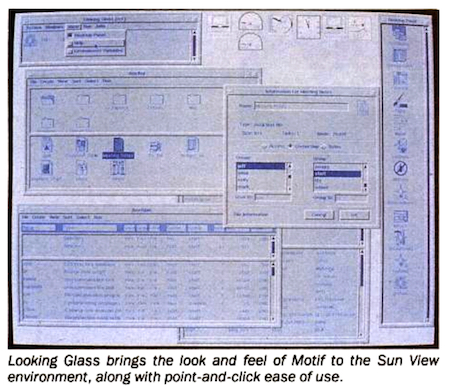
Notice the awesome desktop widgets at the top. That was typical SunView style (flat, lifeless), so Looking Glass was pure awesome eye candy in comparison.
I was hired for the tech support team, and our duties were phone support (typically debugging network configurations and X server font paths) and porting Looking Glass to the more obscure platforms. Being the Lo Mein on the Totem Pole I got given the old platform nobody wanted to touch any more: SunView. (and later on the other old platform nobody wanted to touch any more: Environ V)
SunOS 4.1.X had just come out, and Looking Glass would hang randomly. It worked fine on 4.0.3. My job was to find and fix this hang. This was my first introduction to a lot of things: C, unix systems, windowing systems, navigating large code bases, conditional compilation, debuggers, vendor documentation that wasn’t from Apple, working in a company, and so on. Luckily the SunView version didn’t sell terribly well any more because everyone was moving to X11, but there were a couple of customers bitten by this problem.
So what is SunView? SunView is a windowing system: different programs run displaying graphical output into a window. Nowadays that’s commonplace, but back when SunView came out it was pretty cool. SunView was one of the earlier windowing systems, so it had a bunch of peculiarities. The biggest was that each window on the screen was represented by an honest-to-god kernel device. /dev/wnd5 is a window, as would be /dev/wnd12. There were a finite number of these window devices, so once the system ran out of windows you couldn’t open any more.
There was a definite assumption of “one window to one process” in SunView. Your window was your only playground. Looking Glass was different because it could open multiple windows. Because of the finite number of windows available system-wide, we had to create the alert that said “You can’t open any more windows because you’re out of windows” at launch time, thereby consuming a precious window resource, and hide it offscreen. It was the only way we could reliably tell users why they couldn’t open any more windows. Glad I wasn’t the one that had to make this work in the first place. I was just fixing Legacy Code.
The other peculiarity is that you never got window events. Even in the 1.0 version of the Macintosh toolbox you could easily figure out if the user dragged the window, or resized it, or changed its stacking order. In SunView you just got a signal. SIGWINCH, for WINdow CHange, and hence the memory-lane trigger. The user moved a window? SIGWINCH. The user resized it? SIGWINCH. The user changed the z-order? SIGWINCH.
With just one window that’s not too bad. Just query your only window for its current size. For us, though, we had to cache every window’s location, size, and stacking order. Upon receipt of a SIGWINCH we would walk all of our windows and compare the new values to the cached version. If something interesting changed we would need to do the work of laying out the window’s contents.
So, back to my bug. It took me a solid month to find and fix. All this time I thought I was a failure and was worried I’d get fired. That would be embarrassing. It took so long to fix because it was part time work in amongst my other responsibilities, and also because it was difficult to reproduce. Spastic clicking and dragging could make it lock up, but not reliably. Using a debugger was pointless – my 4 meg Sun 3/50 swapped for two hours as dbx tried to load Looking Glass. I ended up using a lot of caveman debugging.
Event queues
This is the application event architecture we used:
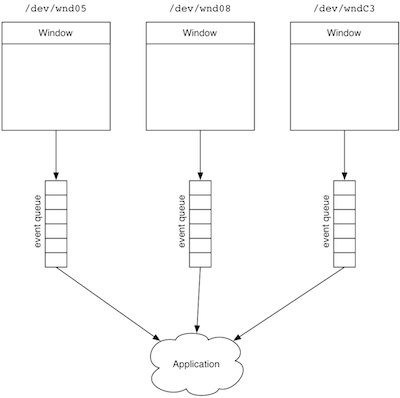
Each window had an event queue (remember that one window to one process assumption) that held all of the mouse and keyboard events. Upon receipt of new events, we would walk our windows: drain all the events, handle them, then move on to the next window.
I was getting some printouts, though, showing a window receiving mouse-downs and mouse-drags, but no mouse-up. Occasionally I would see a mouse-up, with no mouse-downs. Ah-ha! The mouse-up was being delivered to the wrong window’s event queue, probably due to some race condition down in the system that didn’t notice the current window changed during the drag. The fix was easy once I found it : merge the events from all the windows first, and then process them. Happiness and light.
During that fix, I learned how expensive malloc (dynamic memory allocation) is. I malloc’d and free’d event structures, but performance was dog-slow, especially during mouse drags. Caching the structures made life fast again.